






CRM analytics helps businesses turn customer data into useful insights instead of simply storing information. It helps companies better understand customer behaviour, sales trends, and overall business performance.
By analysing customer interactions, purchasing patterns, and engagement data, businesses can improve marketing strategies, strengthen customer relationships, and identify new sales opportunities. This can support better retention, higher revenue, and improved operational efficiency.
This guide covers the main types of CRM analytics, important metrics to track, and common mistakes businesses should avoid during implementation.
Key Takeaways
Businesses often waste analytics investment by skipping stages. Use descriptive, predictive, and prescriptive, the three types of CRM analytics, in sequence to build reliable insights progressively.
Tracking too many metrics causes analysis paralysis. Focus on CAC, CLV, churn rate, and NPS, the four core CRM metrics that directly connect to revenue and retention decisions.
Dashboards built on poor data produce confident-looking but unreliable reports. Always audit, deduplicate, and clean and structure your data before building any analytics layer.
Australian businesses using customer data for analytics must meet Privacy Act 1988 compliance, collect only what is necessary, limit secondary use, and protect personal information from unauthorised access.

What Is CRM Analytics?

CRM analytics is the process of collecting and analysing customer data from an integrated customer management platform to support better business decisions. It is used to track customer behaviour, sales performance, and marketing results more clearly.
Businesses can use CRM analytics to identify customer trends, monitor sales pipelines, and understand which channels generate stronger leads. This allows decisions to be based more on data instead of assumptions.
Many modern CRM platforms now include built-in analytics tools, making it easier for teams to access insights while managing customers, sales activities, and daily operations.
Why CRM Analytics Matters for Modern Businesses
According to McKinsey, companies that lead in customer analytics are 1.5 times more likely to achieve revenue growth above 10% compared to businesses that rely less on data. For Australian businesses facing growing competition and rising customer acquisition costs, data-driven decisions are becoming increasingly important.
CRM analytics can improve revenue and customer retention in several ways:
- Better targeting helps businesses focus on customer segments with higher conversion potential, reducing wasted marketing spend.
- Predictive lead scoring has been linked to conversion rate improvements of up to 30%, according to Salesforce State of Sales 2023.
- Analytics can detect early signs of customer churn, such as lower engagement or declining purchase activity.
- Early customer insights allow businesses to use business tools for customer retention and take proactive action before customers disengage.
- CRM analytics also helps sales teams identify better upsell opportunities based on customer behaviour and product usage patterns.

Types of CRM Analytics
CRM analytics includes different levels of analysis, from basic reporting to advanced decision support tools.
1. Descriptive Analytics
Descriptive analytics focuses on understanding past performance using reports and dashboards. It is commonly used to track sales results, campaign performance, customer service metrics, and other historical business data.
2. Predictive Analytics
Predictive analytics uses historical CRM data to generate data-driven sales predictions and estimate future outcomes such as customer churn or lead conversion potential. This helps businesses prioritise actions more effectively.
3. Prescriptive Analytics
Prescriptive analytics goes a step further by recommending actions based on customer data and predictive models. It can help businesses decide the best offers, communication channels, or sales strategies to use.
Key CRM Analytics Metrics to Track
Effective CRM analytics focuses on tracking the metrics that directly affect customer growth, retention, and profitability.
1. Customer Acquisition Cost (CAC)
CAC measures how much a business spends to gain one new customer. It helps businesses understand which marketing channels and campaigns deliver the best return on investment.
2. Customer Lifetime Value (CLV)
CLV estimates the total revenue a customer may generate throughout their relationship with a business. This helps companies identify which customer segments are the most valuable over time.
3. Churn Rate and Retention Rate
Churn rate measures how many customers stop using a product or service, while retention rate measures how many stay. These metrics help businesses monitor customer loyalty and identify potential retention issues early.
4. Net Promoter Score (NPS)
NPS measures customer satisfaction and loyalty by asking how likely customers are to recommend the business to others. It helps businesses identify both loyal customers and accounts that need attention, informing strategies to improve customer experience across the business.
How to Set Up CRM Analytics in Five Steps
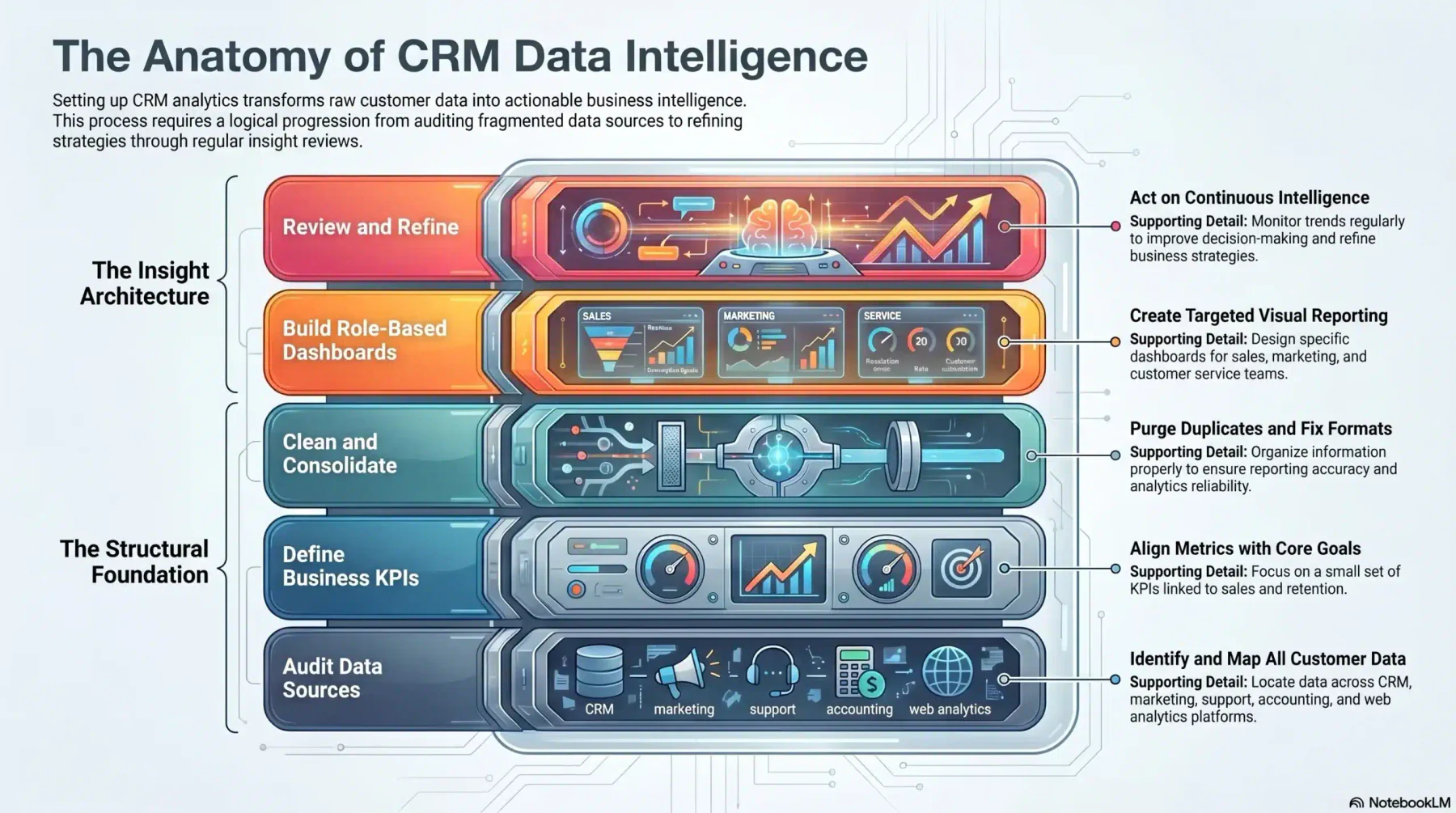
Setting up CRM analytics requires accurate data, clear goals, and regular reporting processes. With the right setup, businesses can turn customer data into more useful and actionable insights.
1. Audit Existing Customer Data Sources
Identify where customer data is stored, such as CRM systems, marketing platforms, support tools, accounting software, or website analytics. This helps businesses understand available data and identify missing information.
2. Define KPIs Aligned with Business Goals
Focus on a small number of KPIs linked to sales, marketing, retention, or operational performance. Clear KPIs make analytics more useful and easier to manage.
3. Clean, Structure, and Consolidate Data
Remove duplicate records, fix inconsistent data formats, and organise customer information properly. Clean data improves reporting accuracy and analytics reliability.
4. Build Dashboards and Reports
Create dashboards based on different business roles, such as sales, marketing, or customer service. Simple dashboards help teams track important metrics more efficiently.
5. Review, Refine, and Act on Insights
Review CRM analytics regularly to monitor trends, identify issues, and improve decision-making. Ongoing analysis helps businesses refine strategies over time.
CRM Analytics Best Practices
CRM analytics delivers better results when supported by clear processes, accurate data, and aligned business goals. The following practices can help businesses improve the effectiveness of their CRM analytics strategy.
1. Align Metrics Across Teams
Sales, marketing, and customer service teams should work with shared metrics and consistent data definitions. This helps businesses improve reporting accuracy and cross-team collaboration.
2. Keep Dashboards Simple and Actionable
Dashboards should focus on the most important KPIs and provide clear insights that support decision-making. Too many reports or unnecessary metrics can make analytics harder to use effectively.
3. Follow Privacy and Data Compliance Requirements
Australian businesses using CRM analytics should comply with the Privacy Act 1988 and Australian Privacy Principles (APPs). Customer data should be protected, collected responsibly, and only used for approved business purposes.
4. Use a CRM Platform with Built-in Analytics
CRM solutions for Australian businesses that include built-in analytics tools can reduce manual reporting, improve data accuracy, and provide faster access to business insights. Integrated analytics also helps businesses avoid disconnected systems and reporting delays.
Common CRM Analytics Mistakes to Avoid
CRM analytics can deliver valuable business insights, but common mistakes can reduce reporting accuracy and decision-making quality. Avoiding these issues helps businesses gain more reliable and actionable results from their CRM data.
Heres are some common CRM Analytics mistakes to avoid:
- Tracking vanity metrics that do not directly support revenue, retention, or business decisions.
- Ignoring data quality issues such as duplicate records, missing information, or inconsistent data entry.
- Building dashboards before properly cleaning and organising customer data.
- Treating CRM analytics as a one-time setup instead of an ongoing business process.
- Using disconnected systems that create reporting delays and inconsistent customer data across teams.
Conclusion
CRM analytics helps businesses turn customer data into better business decisions. With accurate data and clear reporting, businesses can improve sales performance, customer retention, and marketing efficiency.
For Australian businesses, CRM analytics provides better visibility into customer behaviour, sales opportunities, and overall business performance.
The key is to focus on the right metrics, review insights consistently, and use the data to support ongoing business growth.
Consult our experts to find the right CRM analytics setup for your business.

Frequently Asked Question
A basic setup takes four to eight weeks for a business with an existing CRM and reasonably clean data. More advanced implementations involving multiple data sources or custom modelling can take three to six months, depending on data quality at the outset.
Yes, at an appropriate scale. Small businesses benefit from knowing which lead sources convert best and which customers are due for follow-up, without needing predictive modelling. Most modern CRM platforms include sufficient built-in reporting for SMB needs.
Yes. The most valuable implementations pull data from the CRM, marketing automation, billing, support tools, and website analytics via native connectors or API integrations, unified by consistent customer records across systems.
Basic analytics requires only business literacy and CRM familiarity. Custom dashboard building benefits from a data analyst, while advanced modelling requires SQL and statistics knowledge. Many businesses start with a CRM administrator who develops analytics skills over time.
For businesses using a CRM with built-in analytics, cost is typically included in the subscription, AUD $30–$150 per user per month. Standalone BI tools add AUD $500–$3,000 per month. For most small Australian businesses, a CRM with native analytics offers the best cost-to-value ratio.