





Businesses grow faster when their teams can access accurate data and work from reliable systems. However, spreadsheets and disconnected apps often create delays, duplicate work, and unclear customer records.
ERP and CRM software solve these problems in different ways. ERP manages internal operations, while CRM manages customer relationships, sales activity, and service data.
Together, these systems can act as software for business administration by helping companies organise data, automate daily work, and make better decisions across departments.
Key Takeaways
ERP keeps your internal operations running smoothly, while CRM helps you manage customers and sales. Using both gives you a full picture of your business.
When ERP and CRM talk to each other, you cut down on mistakes, speed up processes, and make life easier for every team.
Don’t just install the software. Map your processes, clean your data, and train your teams so everyone can hit the ground running.
Understand how CRM tools boost sales, marketing, and customer support initiatives.
Understanding ERP and CRM
Enterprise Resource Planning, or ERP, started in manufacturing as a way to connect procurement, production, finance, and inventory. Today, ERP helps companies manage core operations through one shared system.
Customer Relationship Management, or CRM, focuses on customer-facing work. It tracks leads, customer conversations, sales activity, support tickets, and marketing engagement.
Although ERP and CRM serve different teams, they work well together. ERP improves internal control, while CRM helps teams win, retain, and support customers.
Key Differences Between ERP and CRM
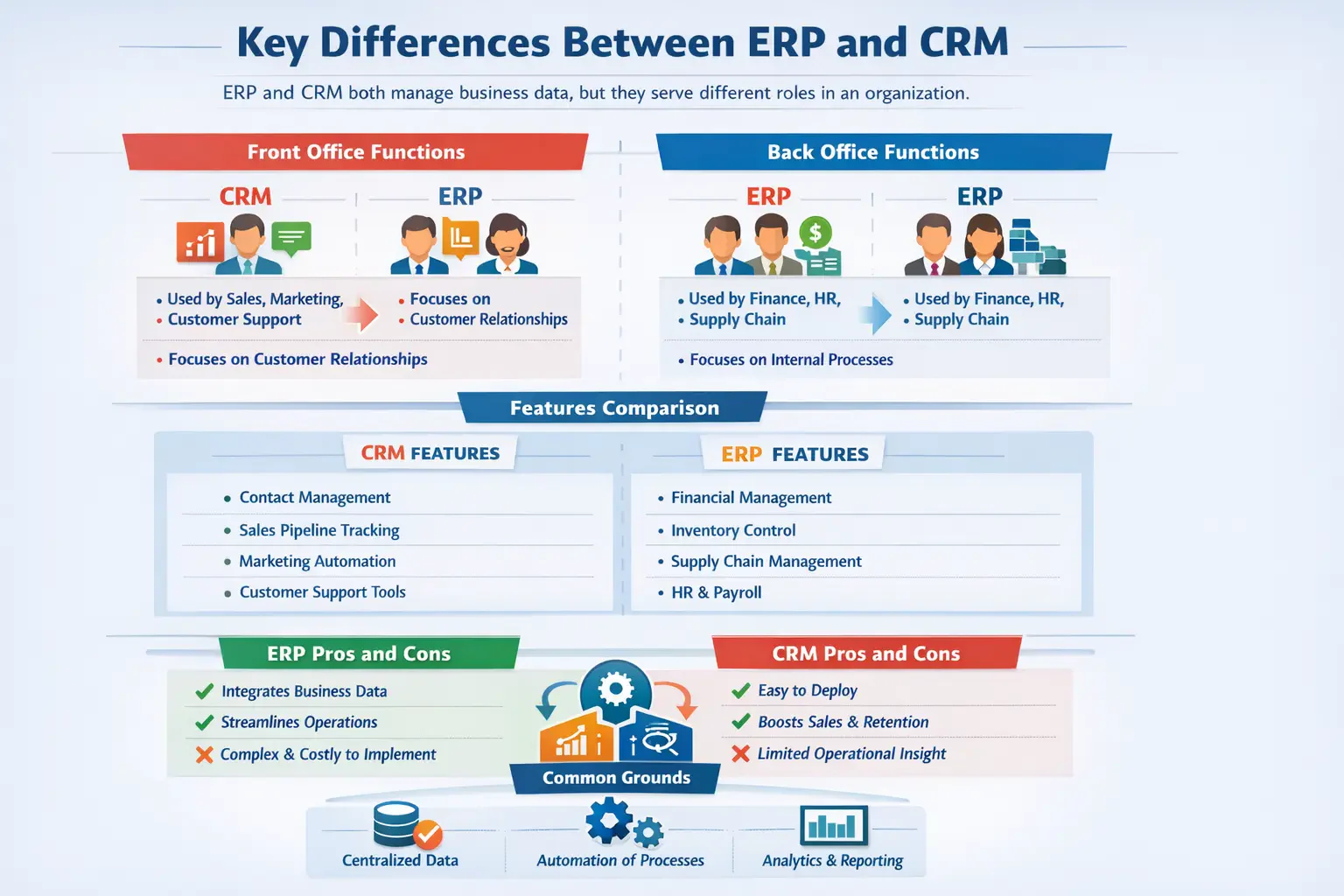
ERP and CRM both manage business data, but they solve different problems. The easiest way to compare them is by looking at who uses them and what each system controls.
1. Front office vs Back office functions
CRM supports front-office teams such as sales, marketing, and customer service. These teams use CRM to manage customer relationships, track opportunities, and follow up with prospects.
The system gives staff a clear view of each customer’s history. As a result, teams can respond faster and personalise communication more effectively.
ERP supports back-office teams such as finance, HR, procurement, operations, and supply chain. These teams use ERP to manage accounting, stock, purchasing, payroll, and fulfilment.
2. Features comparison
CRM and ERP offer different feature sets because they support different areas of the business. CRM focuses on customer growth, while ERP focuses on operational control.
Common CRM features include contact management, sales pipeline tracking, marketing automation, lead scoring, and customer support tools.
Common ERP features include accounting, inventory control, procurement, supply chain management, HR, reporting, and operational planning.
3. ERP pros and cons
ERP systems bring business data into one central platform. This helps teams reduce data silos, improve accuracy, and automate complex back-office processes.
ERP also gives managers better visibility across finance, inventory, procurement, and operations. Therefore, companies can control costs and make decisions with more confidence.
However, ERP projects can take time. They often need careful planning, staff training, data migration, and strong leadership support.
4. CRM pros and cons
CRM systems are usually faster to roll out than ERP platforms. Sales and marketing teams can quickly use CRM to track leads, manage pipelines, and improve customer follow-up.
A well-managed CRM can increase conversion rates, strengthen retention, and help teams run more targeted campaigns.
However, CRM mainly focuses on customer data. Without ERP integration, sales teams may not see important information such as inventory levels, production capacity, or invoice status.
5. CRM and ERP similarities
CRM and ERP both centralise data and reduce manual work. They also help companies replace scattered spreadsheets with structured workflows.
Most modern ERP and CRM platforms run on cloud-based systems. This gives teams easier access, automatic updates, and more flexible scaling.
Both systems also support reporting and analytics. For example, CRM shows sales trends, while ERP shows operational and financial performance.
6. Cost and Implementation considerations
CRM and ERP projects differ in cost, scope, and implementation time. CRM rollouts usually focus on sales, marketing, and service teams, so they often move faster.
Many CRM systems can go live within weeks or a few months, depending on customisation, data quality, and user training needs.
ERP projects usually take longer because they affect finance, procurement, inventory, HR, and other core functions. Even so, the long-term return can be strong when the system improves efficiency and reduces operating costs.
Benefits and Functionalities of ERP
ERP for business operations helps companies manage finance, inventory, procurement, and daily workflows through one connected platform. It gives managers real-time visibility across departments and supports faster decision-making.
1. Accounting, Inventory, and Operations management
ERP systems help finance teams manage ledgers, accounts payable, accounts receivable, assets, and financial reports. These tools also support accurate records and compliance requirements.
Inventory and supply chain features help teams monitor stock across warehouses, forecast demand, and automate purchasing. This reduces stockouts, excess stock, and manual tracking errors.
ERP can also support production planning, labour tracking, quality control, and order fulfilment. When these workflows connect, teams coordinate work more smoothly.
2. Operational efficiency and streamlined processes
ERP improves efficiency by bringing multiple workflows into one system. Instead of switching between emails, spreadsheets, and separate apps, teams work from the same source of data.
Automation reduces manual effort in procurement, approvals, invoicing, and reporting. This helps businesses move faster while reducing administrative errors.
ERP also improves collaboration between departments. For example, finance can see purchasing data, while operations can check stock and supplier updates.
3. ERP benefits for businesses
ERP gives executives and managers a clearer view of business performance. Dashboards and reports can show sales, expenses, inventory, cash flow, and operational activity in one place.
It also supports standardised workflows across locations and teams. This matters for growing companies that need consistent processes.
In addition, ERP improves security, compliance, and scalability. As the business expands, the system can support more users, locations, and operational complexity.
Benefits and Functionalities of CRM
CRM software for Australian businesses helps sales, marketing, and support teams manage customer relationships in a structured way. It centralises customer data so teams can track every interaction and improve the customer experience.
1. Sales, Marketing, and Customer support
CRM systems help sales teams manage leads, opportunities, follow-ups, and forecasts. They make the sales pipeline easier to monitor and improve accountability across the team.
Marketing teams use CRM data to segment audiences, run campaigns, track engagement, and identify qualified leads. Then, sales teams can focus on prospects with stronger buying intent.
Customer support teams use CRM to manage tickets and service history. This helps agents respond faster because they can see previous conversations, purchases, and issues.
2. Enhanced customer relationships and Insights
CRM gives teams a complete view of each customer. It can store emails, calls, purchases, meetings, support tickets, and marketing activity in one profile.
This shared data helps sales, marketing, and support teams work together. Customers also receive more consistent communication because staff can see the same information.
CRM analytics can reveal customer behaviour, sales trends, campaign performance, and churn risks. These insights help teams act before problems grow.
3. CRM benefits for businesses
CRM helps increase revenue by improving lead conversion and shortening the sales cycle. Automation also reduces repetitive work for sales and marketing staff.
It can also improve customer loyalty through faster responses and more relevant communication. Customers are more likely to stay when teams understand their needs.
With clear reporting, CRM helps managers make decisions based on real customer data. This reduces guesswork and improves campaign planning.
ERP and CRM Integration

ERP and CRM can work separately, but disconnected systems often create delays. Sales teams may need finance updates, while customer service teams may need order or inventory information.
Integration connects front-office and back-office data. As a result, teams can reduce duplicate entry, avoid errors, and respond to customers faster.
When and why to integrate ERP and CRM
Integration becomes important when staff repeatedly copy data between systems. For example, sales may close a deal in CRM, then manually enter the order into ERP.
Connecting the systems creates one reliable source of truth. Updates in one platform can flow into the other, which helps teams work faster and with fewer mistakes.
Integration also improves customer service. Staff can check invoices, stock, order status, and customer history without chasing other departments.
Key Features Supporting Integration
Modern APIs allow ERP and CRM platforms to share data in real time. They can sync customer records, product pricing, stock levels, orders, invoices, and payment status.
Automation triggers also help teams coordinate work. For example, if a customer has overdue invoices in ERP, CRM can alert sales before a new order is approved.
These features reduce manual work and improve visibility across the full customer journey.
Best Practices for Successful Integration
Start by setting clear data ownership rules. Decide which system manages customer details, product records, pricing, invoices, and order information.
Then, map the full customer and order process before connecting data fields. This helps the integration support real workflows instead of creating confusion.
A staged rollout usually works best. Businesses can start with high-impact workflows, test the data flow, and then expand integration over time.
Industry-Specific Use Cases for ERP and CRM
ERP and CRM support many sectors, but each industry uses them differently. The right setup depends on how the business sells, delivers, tracks, and supports its products or services.
1. Manufacturing and Distribution
Manufacturers use ERP to manage materials, production schedules, inventory, quality control, and logistics. CRM helps them manage distributors, B2B customers, contract negotiations, and sales pipelines.
When both systems connect, sales teams can check production capacity and stock before confirming delivery commitments.
2. Retail and E-Commerce
Retailers use CRM to track customer behaviour, loyalty programmes, marketing campaigns, and service history. ERP handles inventory, purchasing, warehousing, supplier payments, and order fulfilment.
Together, these systems help retailers match demand with stock availability and improve customer communication.
3. Professional Services and Agencies
Professional services firms use CRM to manage leads, proposals, client communication, and account relationships. ERP helps them manage project accounting, resource planning, payroll, and billable hours.
This setup gives managers better visibility into revenue, workload, and project profitability.
Strategic Implementation Steps
Rolling out ERP or CRM requires more than software installation. Businesses need clear goals, clean data, trained users, and a practical rollout plan.
The actions below help reduce risk and improve adoption.
1. Needs Assessment and Goal Setting
Start by identifying the business problems you want to solve. For example, you may want to reduce stock errors, speed up month-end reporting, or improve lead conversion.
Set measurable goals before choosing software. Clear goals make it easier to compare vendors and track success after launch.
2. Data Auditing and Cleansing
Clean data before migration. Remove duplicate records, outdated contacts, incorrect product details, and inconsistent naming formats.
Good data helps teams trust the system from day one. It also reduces reporting errors after the platform goes live.
3. Vendor Selection and Blueprinting
Choose software that fits your business size, processes, and growth plans. Look for usability, integration options, support quality, and reporting capability.
Then, test the system with real business scenarios. This helps confirm whether the platform supports daily workflows.
4. Change Management and Training
People determine whether ERP or CRM succeeds. Train users based on their roles so they understand how the system helps their daily work.
Appoint internal champions who can answer questions and support adoption. Regular feedback also helps teams adjust the rollout when issues appear.
Common Pitfalls to Avoid
ERP and CRM projects can fail when businesses treat them as simple IT installations. They work best when leaders manage them as business-wide improvements.
One common issue is over-customisation. Too much customisation can make upgrades expensive and create systems that are hard to maintain.
Another risk is weak executive support. Without clear leadership, teams may resist change or keep using old spreadsheets.
Poor data quality can also damage trust. If users see wrong records after launch, they may stop relying on the system.
Advanced Practices for Maximizing System Value
Once ERP or CRM is running well, businesses can use advanced features to gain more value. AI, automation, and integrated workflows can improve speed and accuracy.
For example, CRM can help predict which leads are most likely to convert. ERP can help forecast stock needs, supplier risks, and cash flow.
A strong quote-to-cash process also links CRM and ERP closely. Sales quotes can become orders, invoices, and payments with less manual work.
This improves cash flow, reduces errors, and creates a smoother customer experience.

Conclusion
ERP and CRM systems help companies improve operations, customer relationships, and decision-making. ERP manages the internal side of the business, while CRM supports customer-facing teams.
When both systems connect, teams gain a clearer view of operations and customers. This reduces manual work, improves accuracy, and helps staff make faster decisions.
For growing businesses, the right ERP and CRM setup can improve efficiency, revenue, and customer satisfaction. Request a free consultation to see which system best fits your business needs.
Frequently Asked Questions About ERP vs. CRM
What’s the difference between ERP and CRM?
ERP manages internal operations like finance, inventory, and HR, while CRM focuses on customer relationships, sales, and marketing. Together, they give a full view of your business.
Can a business use ERP without CRM?
Yes, but without CRM, you may miss insights into customer behaviour and sales opportunities. Integrating both improves efficiency and revenue tracking.
Which system is easier to implement?
CRM systems are generally quicker to deploy and easier to adopt, while ERP implementations are larger projects requiring more time, training, and investment.
Do ERP and CRM share data?
When integrated, yes. Integration creates a single source of truth, letting updates in one system automatically reflect in the other.
How do I know which system my business needs first?
If your main challenge is managing customer interactions and sales, start with CRM. If operational efficiency, inventory, and finance are key, start with ERP. Integration can come later.