




A Kitchen Display System (KDS) is a digital setup that replaces paper dockets in restaurant kitchens. It shows incoming orders in real time, routes tickets to the correct station, and tracks prep times automatically. KDS platforms connect directly to the POS, online ordering channels, delivery aggregators, and a system for streamlining kitchen workflow. Modern platforms run on commercial-grade touchscreens or rugged tablets. Orders flow through APIs or WebSockets from the POS, appear on the relevant screen within seconds, and stay visible until a chef bumps them off using a physical bump bar or on-screen gesture. Head chefs can reorder tickets, recall completed items, split courses, and fire orders manually when service demands, giving the kitchen tighter control than any printed docket allows. KDS adoption accelerated as Australian venues embraced online ordering, third-party delivery, and multi-channel service. According to the Australian Bureau of Statistics, cafes, restaurants, and takeaway services generated around AUD $5 billion in monthly turnover, with digital order volumes rising sharply since 2022. Unlike paper tickets, a KDS captures every order event for analytics. Managers review prep times, identify bottlenecks, and feed data back into menu engineering and rostering decisions. Australian restaurants run on thin margins, rising labour costs, and demand that swings between dine-in, takeaway, and delivery. Paper tickets cannot keep pace, while a KDS delivers the speed, accuracy, and visibility kitchens need. A KDS displays orders the moment the POS or delivery app confirms payment, removing any delay from printing and sorting dockets. Prep times drop by 15 to 25 per cent, which lifts table turns and delivery throughput at peak. Colour-coded modifiers, allergen alerts, and bump-bar confirmations cut the risk of lost or misread tickets. Kitchens see measurable drops in remakes, voids, and complaints, protecting food cost margins and online reputation. Live dashboards show ticket counts, prep times, station load, and late orders in real time. Managers step in before service breaks down, shift staff between stations, and track trends that sharpen rostering and accountability. KDS hardware costs more upfront than printers, yet it removes recurring spend on paper, ink, and servicing. Multi-site venues usually recover the investment within 12 to 18 months through consumables and labour gains. Kitchen display systems automatically store order timestamps, preparation times, and ticket history across kitchen operations. These records help restaurants support Food Safety Supervisor compliance and audit readiness under FSANZ Standard 3.2.2A requirements. A KDS routes every item to the correct station the moment an order confirms, drinks to the bar, entrées to the pantry, and mains to the grill, without manual sorting or verbal handoffs from the front of house. Misrouted tickets delay the whole table, and eliminating them keeps every station focused and service moving at pace. A KDS is more than a screen on the wall. It blends hardware, software, and integrations that move orders from customer to pass without paper or manual handoffs. Each component shapes the final setup. Commercial displays, typically 15 to 24 inches with IP65 ratings, handle heat, grease, and steam in working kitchens. Stainless-steel or powder-coated mounts place screens at eye level above each bench without eating prep space. Physical bump bars give chefs tactile control, letting them advance, recall, or mark items ready without touching greasy screens. Some venues use foot pedals, tablets, or voice controls for hands-free operation in busy kitchens. The software layer assigns tickets to stations based on menu categories, modifier logic, and firing rules. Managers configure courses, priorities, and expeditor views centrally, so each station sees only the items it owns. A fully integrated KDS connects to delivery aggregators (Uber Eats, Menulog, DoorDash), ERP platforms for inventory and procurement, finance systems, and a POS software for simplify kitchen display. One feed removes tablet stacking at the pass and keeps every channel inside the same prep logic Reliable operation depends on commercial Wi-Fi, wired Ethernet backup, and 4G or 5G failover for cloud platforms. UPS units keep screens alive through short outages, while offline caching lets the kitchen trade through brief drops. Different kitchen display system setups support different restaurant workflows, service models, and kitchen layouts. Kitchen printers rely on paper tickets, which can be lost, damaged, or delayed during busy service periods. Kitchen display systems replace paper with digital order routing, improving order visibility and reducing communication errors between stations. KDS platforms also support real-time order updates, while printers cannot retract or modify tickets once printed. Over time, many restaurants also reduce paper, ink, and maintenance costs by switching to digital kitchen workflows. Kitchen display systems help restaurants manage high order volumes, multiple kitchen stations, and fast-paced service more efficiently. Different restaurant models use KDS platforms to improve kitchen coordination and operational consistency. Rolling out a KDS is a change-management exercise as much as a tech project. Venues that plan carefully, train staff, and run a controlled pilot see faster adoption and fewer service disruptions on day one. Document how orders move from dine-in tables, online channels, and delivery apps through to each station today. Identify delays and common errors, then use this baseline to shape station layout and routing rules. Select displays, bump bars, and mounts suited to your kitchen, and shortlist KDS platforms that have POS and kitchen synchronisation. Prioritise cloud platforms with offline caching, open APIs, and solid uptime. Work with the head chef to map every menu item to the correct station, set course timings, and define firing rules for multi-course service. Test modifier logic, allergen alerts, and expeditor views in staging before going live. Run hands-on training for kitchen, floor, and management staff, then pilot the KDS during quieter services before peak. Collect feedback, refine routing rules, and switch off the printers only once the pilot runs cleanly for a week. KDS platforms suit any venue where orders flow through a kitchen, yet each segment has distinct needs. Matching the KDS to the venue type ensures the system supports the actual service style rather than forcing a solution. Cafes benefit from compact single-screen setups with one integrated workflow. Cloud kitchen management keep costs low, and timers help baristas and cooks coordinate coffee, cabinet food, and breakfast orders during the morning rush. Full-service venues use multi-station KDS layouts with expediter screens at the pass. Course firing, table-level views, and modifier flags support longer dine-in services and sync prep timing with reservations and pacing. This is assisted by restaurant order management that streamlines process orders, reducing errors and giving owners the data they need to grow their business. QSR operators rely on KDS to handle high ticket volumes across counter, drive-through, and delivery. Real-time timers, channel views, and order-ahead routing keep service fast, while analytics track speed-of-service across stores. Ghost kitchens run multiple brands from one production space, and KDS platforms keep each brand’s orders visually separated. Delivery APIs pull Uber Eats, Menulog, and DoorDash into one screen, preventing tablet chaos and missed acceptance. Hotels and catering operators use KDS across room service, banqueting, and multiple outlets. Central dashboards give F&B managers visibility across every kitchen, and function-room firing rules coordinate plated meals to timing cues. Even well-funded KDS rollouts stumble when operators treat the system as plug-and-play. The most common mistakes relate to planning, training, and integration, and each one undermines the speed and accuracy the KDS should deliver. Installing a KDS on top of an unchanged paper-based workflow locks in old inefficiencies. Venues that rebuild their order flow during rollout see much stronger results than those that mirror the old docket layout on screen. Chefs who mistrust the KDS default back to printed tickets, and waiters who misuse modifiers create errors downstream. Role-specific training during the pilot is essential, with refreshers whenever menus or routing rules change. Cloud-based KDS platforms depend on a reliable network. Venues that skip UPS units, wired backups, or 4G failover discover the weakness mid-service. Robust infrastructure planning keeps the kitchen running through minor disruptions. The real long-term value of a KDS sits in its analytics. Operators who never review prep times, station loads, or late-order trends miss the insights that justify the investment and forfeit gains in rostering and menu engineering. Strong KDS outcomes depend on disciplined planning, consistent training, reliable hardware, and tight integration with the tech stack. These practices help Australian venues capture the full value of their KDS investment from day one. Break the rollout into discovery, configuration, pilot, and launch phases, each with defined owners. A phased plan surfaces issues early, keeps stakeholders aligned, and avoids the chaos of switching every station in a single shift. Run role-specific training for chefs, expediters, floor staff, and managers, combining classroom sessions with live rehearsals. Post quick-reference guides at each station, and include KDS handling in onboarding so new hires ramp fast. Specify consistent displays, mounts, bump bars, and network gear across every site. Standardisation simplifies maintenance, speeds replacements, and holds every kitchen to the same baseline, which matters most for multi-site groups. Connecting the KDS to an ERP platform like HashMicro links kitchen data to inventory, procurement, and finance in real time. Operators track live food cost, automate stock deductions per ticket, and unlock reporting no standalone tool delivers. Integrated kitchen display systems help restaurants improve inventory visibility, kitchen coordination, and operational cost control across daily service activities. A Kitchen Display System turns the kitchen from a paper bottleneck into a measurable, data-rich operation. Venues that deploy a well-configured KDS gain faster service, fewer errors, and sharper visibility across labour and food cost. The strongest results come when operators treat the KDS as part of a broader digital stack, not a standalone tool. Pairing it with a modern POS, delivery integrations, and an ERP platform gives the business a single source of truth, where the real advantage sits. If you are interested in implementing your own kitchen display system, you can get a kitchen display consultation with our team today and let us assist you in the process. KDS pricing depends on scale. Ruggedized displays that are built to withstand intense kitchen heat, grease, and smoke run $800-$2,500+ per unit, while commercial all-in-one monitors run $900-$2,000+ per unit. Passive displays and external compute boxes run $300-$700 per unit for the display only. A POS manages customer-facing transactions like ordering, payment, and receipts, while a KDS manages kitchen-side preparation. The POS captures the order and sends it to the KDS, which routes it to the right station and tracks prep time. Most single-site rollouts take two to six weeks from kick-off to go-live, depending on menu complexity and integrations. Multi-site groups usually plan a six to twelve week programme, piloting at one venue before rolling out in waves. Yes. A KDS captures a time-stamped record of every order, including modifiers and allergen flags, which supports Food Standards Australia New Zealand record-keeping. Some platforms also integrate with temperature logs and HACCP checklists. Cloud-based KDS platforms store order history and configurations in the vendor's data centre, so replacing a screen does not erase data. Staff sign in on the new hardware and the previous setup loads automatically.
What Is a Kitchen Display System (KDS)?


Why Kitchen Display Systems Matter for Australian Restaurants
1. Faster order turnaround across every channel
2. Fewer mistakes and missed items
3. Better visibility for managers and head chefs
4. Lower running costs over the long term
5. Food safety record-keeping under Standard 3.2.2A
6. Automatic order routing to the right prep station
Key Components of a Kitchen Display System
1. Touchscreen displays and mounts
2. Bump bars and controller inputs
3. KDS software and routing rules
4. Integrations with POS and delivery platforms
5. Network and failover infrastructure
Types of Kitchen Display Systems
Kitchen Display System vs Kitchen Printers
Aspect
Kitchen Display System (KDS)
Kitchen Printers
Order format
Digital screens with colour-coded tickets and timers
Paper dockets printed per order
Real-time updates
Instant edits, cancellations and modifiers sync across stations
Requires reprinting or manual correction on the docket
Accuracy
Reduces missed items with bump-bar confirmation and visual alerts
Prone to lost, smudged or misread tickets
Consumables
Paperless, no ink or thermal rolls required
Ongoing cost for paper rolls, ribbons and servicing
Failure handling
Offline caching and automatic routing to backup screens
Jams or outages halt order flow until fixed
Analytics
Captures prep times, bottlenecks and station performance
No data capture beyond the printed ticket
Upfront cost
Higher initial hardware and software investment
Lower entry cost per unit
Long-term cost
Lower running cost, no consumables, scalable across sites
Recurring spend on paper, ink and replacement units
Who Should Use a Kitchen Display System?
How to Implement a Kitchen Display System
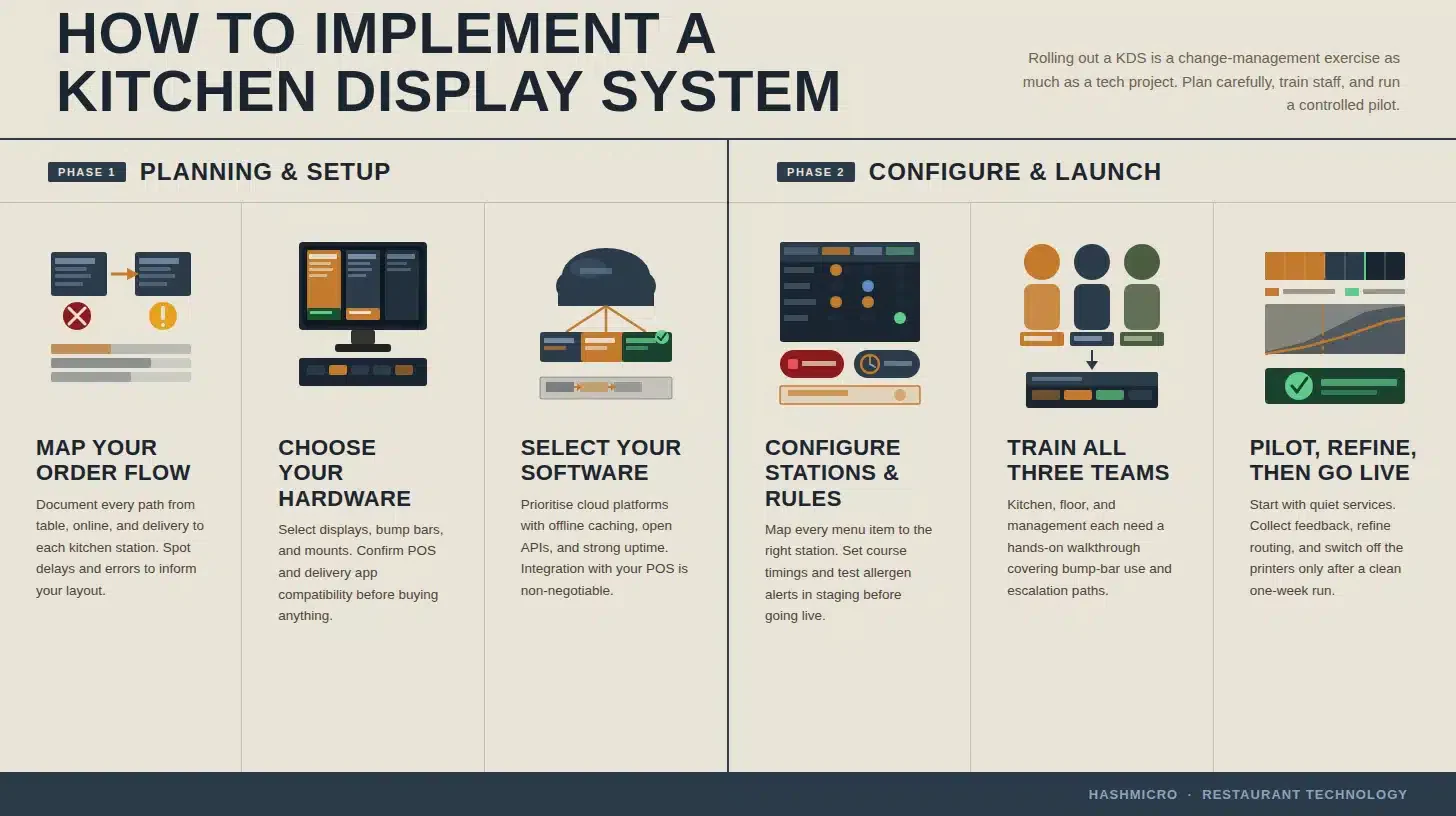
1. Map your current order flow
2. Choose the right hardware and software stack
3. Configure stations, courses, and firing rules
4. Train staff and run a controlled pilot
Kitchen Display Systems Across Industries
1. Cafes and coffee shops
2. Full-service restaurants
3. Quick-service and fast-casual restaurants
4. Ghost kitchens and delivery-only brands
5. Hotels, catering, and large venues
Common Mistakes to Avoid When Using a KDS
1. Skipping the workflow redesign
2. Under-training kitchen and front-of-house staff
3. Ignoring failover and connectivity planning
4. Treating KDS data as optional
Best Practices for Implementing a Kitchen Display System
1. Plan a phased rollout with clear milestones
2. Invest in hands-on staff training
3. Standardise hardware and network specifications
4. Use a KDS-ERP integrated platform
How Kitchen Display System Integration Reduces Food Cost Leak
Conclusion
Frequently Asked Question
Kitchen Display System: How Does It Improve Operations?

A Kitchen Display System provides a single live view of every order in the kitchen. For Australian restaurants juggling dine-in, takeaway, and delivery under tight margins, KDS has moved from a nice-to-have to core operational infrastructure.


Ricky Halim is a professional in the field of technology and business development who focuses on innovative corporate solutions. With extensive experience in product management and growth strategy, Ricky has played a key role in making HashMicro the leading ERP solution in Southeast Asia, a breakthrough that combines system intelligence with modern operational needs.
HashMicro follows strict editorial standards and uses primary sources such as regulations, industry guidance, and trusted publications to keep content accurate and relevant.