






A bill of materials (BOM) is a hierarchical document that lists every raw material, component, and subassembly required to manufacture a finished product. It serves as the definitive reference for production, procurement, and engineering teams.
This guide covers what a bill of materials contains, how it is structured, and how manufacturers can keep it accurate and integrated with procurement, production, and ERP systems from design through to delivery.

What Is a Bill of Materials?

A Bill of Materials (BOM) is a structured list of all the raw materials, components, assemblies, and sub-components required to manufacture a product. It details exactly what is needed, in what quantities, and how each part fits together to serve as the definitive reference for production planning.
A bill of materials is a comprehensive list of all materials, parts, and subassemblies required to produce a finished product. It records not just what is needed, but the exact quantity and form each item must take.
The document acts as the bridge between product design and physical production. Engineers use it to communicate their exact design intent, while the factory floor uses it as an actionable guide for assembling the product.
Each line item in a BOM carries a unique part number, a standardised description, the required quantity, and a unit of measure. These data fields eliminate ambiguity across purchasing, production, and quality control.
A BOM also captures the structural relationship between parts. A parent item, such as a wheel assembly, contains child components like a rim, tyre, hub, and spokes. This hierarchy guides assembly sequence and production routing.
Beyond the factory floor, this data informs cost calculations, supplier planning, and ERP systems. It is the single source of truth connecting design to procurement, production, and financial reporting. Many businesses also adopt product component tracking tools to improve visibility and control across complex assemblies.

Why a Bill of Materials Matters in Manufacturing
A BOM does more than catalogue parts. It drives purchasing, production scheduling, and cost reporting across the business. When accurate, operations run smoothly. When it contains errors, the impact is immediate and wide-reaching.
1. Preventing production delays and downtime
Manufacturing lines depend on continuous flow. If a BOM omits a component or lists the wrong quantity, production stops the moment workers discover the shortage. This is known as a line-down situation.
During a line-down, the business continues to pay for labour, utilities, and overhead while producing nothing sellable. Procurement then faces expensive expedite fees to rush missing parts to the floor.
An accurate BOM prevents this by ensuring all required components are identified, ordered, and staged well before production begins. This keeps throughput consistent and eliminates avoidable delays.
2. Controlling material costs and the cost of goods sold
When a BOM accurately reflects the physical product, accounting teams can calculate the exact Cost of Goods Sold (COGS). This supports accurate pricing and protects profit margins across all product lines.
If a BOM lists five bolts but the actual assembly uses six, the business loses the cost of that sixth bolt on every unit produced. At scale, even a single omission can significantly erode profitability.
Inaccurate BOMs also cause over-purchasing. If the document overstates the required quantity of a costly component, procurement buys too much, tying up working capital in excess stock that may never be used.
3. Improving quality control and reducing rework
Quality control depends on the BOM specifying correct part revisions and tolerances. If the document references an outdated component, production builds to the wrong specification, causing failures at final inspection.
A well-structured BOM contains more than a parts list. Each line item must carry specific, standardised data fields that leave no room for ambiguity in purchasing, production, or quality control.
1. Part numbers, names, and descriptions
Every component in a BOM requires a unique part number. This identifier is used consistently across all systems, from CAD and PLM to ERP, ensuring no two items are confused during ordering or assembly.
Each item also needs a clear, standardised description. For example, “Hex Bolt, M8x1.25, Stainless Steel” tells a worker exactly which fastener to pick. Without this clarity, assembly errors are unavoidable.
2. Quantities and units of measure
The quantity field specifies how many units of each component are needed per parent assembly. If a table requires four legs, the quantity for the leg component is precisely four, with no room for interpretation.
The unit of measure (UOM) is equally critical. Discrete parts are counted in pieces, while raw materials may be measured in grams, metres, or millilitres. A mismatch in UOM causes purchasing errors and line stoppages.
3. Revision levels and lifecycle status
Products evolve through engineering change orders, which update the BOM whenever a design is corrected or a part is replaced. Each update advances the revision level, so teams always build to the current version.
Lifecycle status flags whether a part is active, experimental, or nearing obsolescence. This prevents procurement from ordering discontinued components and helps engineering plan design transitions in advance.
BOM notes add a further layer of detail. These fields capture handling instructions, torque specifications, or approved substitute parts that can be used when the primary component is unavailable.
4. Procurement type
The procurement type field defines how each component enters the production process. Common types include make, buy, and phantom, and each one drives different actions across purchasing and production planning.
A “buy” component triggers a purchase order when demand is raised. A “make” component generates a work order for internal production instead. Phantom components pass their usage directly to child items without creating a separate order, which simplifies structures for modular assemblies.
Getting this field right from the start prevents misrouted orders and ensures demand signals reach the correct team, whether that is the purchasing desk or the production floor.
How to Structure and Manage a Bill of Materials
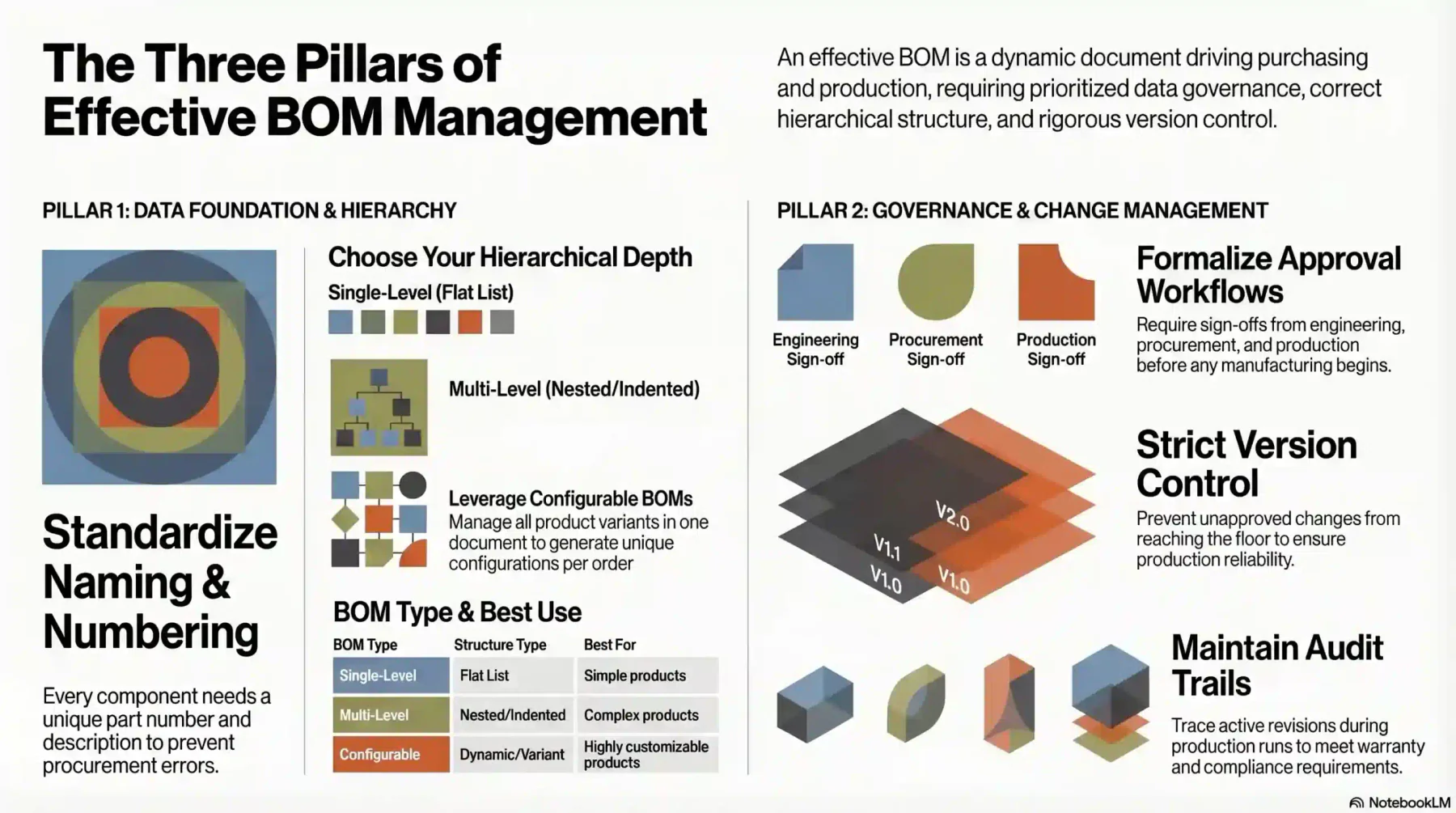
Building an effective BOM requires more than listing parts. Manufacturers must define the hierarchy, establish version control, and integrate the document with the systems that drive purchasing and production.
1. Standardise naming conventions and part numbering
The priority is strict data governance. Every component needs a unique part number and a standardised description to prevent duplicate entries and ensure procurement orders the correct item every time.
Consistent naming also supports searchability across PLM and ERP systems. When teams use different naming conventions for the same part, duplicates appear, and the BOM becomes an unreliable source of data.
2. Define the hierarchy and choose the right BOM type
Manufacturers must choose between a single-level and a multi-level BOM. A single-level format suits simple products and lists all items flat. A multi-level BOM uses indentation to show how parts roll up into subassemblies.
For highly configurable products, a Configurable BOM allows manufacturers to manage all variants in one document. The system then generates a unique BOM for each customer configuration at the point of order. This approach also supports more accurate material usage planning across different product variations.
3. Establish approval workflows and version control
Every BOM change must follow a formal approval process. Engineers, procurement officers, and production leads should all review and sign off on updates before any purchasing or manufacturing activity begins.
This workflow prevents unapproved changes from reaching the floor. It also creates an audit trail so teams can trace which revision was active during a production run. This matters for warranty and compliance.
The Bill of Materials Management Process
Managing a Bill of Materials (BOM) requires a structured process to ensure every component, quantity, and production requirement is accurate before manufacturing begins.
1. Gather Product Design Specifications
Begin by collecting product drawings, CAD files, engineering documents, and manufacturing requirements. This ensures the BOM is based on accurate and up-to-date product specifications.
2. Define the BOM Hierarchy
Organise the BOM into parent items, sub-assemblies, components, and raw materials. A clear hierarchy improves visibility and simplifies production planning.
3. Assign Part Numbers and Item Codes
Give each component a unique part number or SKU to avoid duplication and confusion. Standardised codes also improve inventory tracking and procurement accuracy.
4. Set Quantities and Units of Measurement (UOM)
Specify the exact quantity and unit of measurement required for each item in the BOM. Accurate data helps prevent material shortages and excess inventory.
5. Validate Against Physical Inventory
Compare BOM requirements with current warehouse and inventory records before production begins. This step helps identify missing materials, obsolete stock, or inventory discrepancies.
6. Release Changes Through Engineering Change Orders (ECO)
Any BOM updates should go through a formal Engineering Change Order (ECO) approval process. Controlled revisions help maintain version accuracy across all departments.
7. Integrate the BOM Into ERP or Manufacturing Systems
Import the finalised BOM into the ERP or manufacturing management system for operational use. Integration supports purchasing, inventory management, production scheduling, and cost control.
Once integrated, the ERP uses the BOM to automatically generate material requirements plans (MRP), trigger purchase orders when stock falls below reorder points, and update cost of goods calculations whenever a component price changes.
Bill of Materials in Asset Management
Bill of Materials (BOM) plays an important role in asset management, especially when supported by asset management software that centralises maintenance and tracking.
It is widely used for spare parts tracking, allowing each component to be documented and easily identified when replacements are needed. BOM also supports predictive maintenance scheduling, helping teams anticipate failures and perform maintenance.
In addition, BOM supports equipment lifecycle management by covering the full lifecycle of an asset from acquisition to disposal.
Bill of Materials Across Industries
While the core structure of a BOM remains consistent, its application varies across sectors. Each industry adapts the framework to suit its own production complexity, regulatory requirements, and supply chain demands.
1. Electronics and technology manufacturing
In electronics, the Engineering BOM is closely tied to printed circuit board (PCB) layouts. Each item details microscopic components such as resistors, capacitors, and microchips, along with precise placement specifications.
Reference designators are critical in this context. They specify exactly where each component sits on the PCB, for example, “R12” for a resistor or “C4” for a capacitor, eliminating guesswork during assembly.
Product cycles in this sector move fast. Version control is particularly vital, as component obsolescence is common and alternative parts must be validated and documented quickly to prevent production interruptions.
2. Automotive and aerospace
These industries rely on complex, multi-level BOMs managing tens of thousands of parts per vehicle or aircraft. A single model may include everything from engine block castings to the specific grade of interior leather.
Regulatory compliance demands rigorous version control. Manufacturers must identify which BOM revision was used to produce any unit, often years after the build date, to support recalls and warranty claims.
3. Software and cybersecurity
The BOM framework has expanded into software through the Software Bill of Materials (SBOM). An SBOM catalogs the open-source libraries, third-party dependencies, and proprietary code within an application.
This is now a critical cybersecurity compliance requirement. When a vulnerability is discovered in a widely used library, an SBOM lets developers identify which applications are affected and prioritise patching quickly.
4. Bill of materials in Australian manufacturing
Australian manufacturing businesses face unique supply chain challenges, including reliance on imported components and long lead times from international suppliers. A well-maintained BOM helps manage this complexity.
Industries such as food and beverage, defence manufacturing, and industrial production must also comply with strict regulatory frameworks. Many also rely on production materials mapping to align supply availability with production schedules.
For example, defence manufacturers often need to align with Defence Aviation Safety Authority (DASA) standards and Australian Defence Force (ADF) supplier requirements, ensuring full traceability and compliance across all materials used.
The Australian Bureau of Statistics publishes manufacturing output and supply chain data that businesses can use to benchmark procurement lead times and material planning against industry performance.
Common BOM Mistakes to Avoid
Even with the right systems in place, procedural lapses can compromise BOM integrity. The most damaging mistakes tend to be habitual and often go undetected until they cause a visible production or financial failure.
1. Neglecting version control after design changes
Engineering change orders are routine in product development. When an approved change is not reflected in the BOM and distributed to all affected teams, multiple versions of the document begin to circulate.
The result is procurement ordering parts for an outdated design while production expects updated components. This discrepancy typically surfaces only after incorrect parts have already been received and staged.
2. Inconsistent or missing units of measure
Specifying a quantity of “10” without a unit of measure is a frequent and costly oversight. That figure could mean 10 pieces, 10 metres, or 10 grams. Without a clear UOM, procurement cannot order accurately.
A UOM mismatch can halt an assembly line or cause significant budget overruns. Enforcing a standardised unit of measure for every line item, regardless of how obvious it seems, is a non-negotiable discipline.
3. Working in departmental silos
When engineering and manufacturing maintain separate BOMs without synchronisation, critical discrepancies are inevitable. The EBOM and MBOM can diverge until neither document is fully reliable.
When procurement substitutes a part without notifying engineering, the official BOM no longer reflects the physical product. These undocumented substitutions accumulate and make quality issues difficult to trace.
Best Practices for Bill of Materials Management
Maintaining BOM integrity at scale requires more than accurate data entry. The following practices help manufacturers keep their BOMs reliable, integrated, and aligned with the pace of product and supply chain change.
1. Centralise the BOM in a single system of record
Spreadsheets are a common starting point, but they break down quickly as product complexity grows. Moving the BOM into a centralised PLM or ERP platform ensures all teams have access to the same live document at all times.
A centralised system eliminates conflicting versions circulating across departments. It also enables real-time updates, so any approved change is immediately visible to engineering, procurement, and production simultaneously.
2. Establish a formal change management process
Every BOM update should move through a structured engineering change order process. This means documenting the reason for the change, identifying affected assemblies, and obtaining cross-team sign-off before release.
A formal process ensures downstream impacts are considered before approval. A minor component swap can affect procurement lead times, assembly routing, and cost calculations across the entire product line.
3. Conduct regular BOM audits and data validation
Periodic audits compare the BOM against physical inventory and production records to identify discrepancies before they cause stoppages. Even well-managed documents drift from physical reality without routine verification.
Advanced manufacturers use automated validation tools to cross-reference BOMs against supply chain databases. These systems flag components with impending shortages, extended lead times, or approaching obsolescence.
4. Use software to automate BOM management
Integrating the BOM with a manufacturing management system automates material requirements planning, purchasing, and inventory management. When the BOM changes, the system recalculates demand and adjusts procurement schedules accordingly.
ERP platforms enable seamless data flow between engineering, procurement, and finance. A design change made in the PLM can automatically update cost estimates and purchasing forecasts, removing manual reconciliation entirely.
Conclusion
A bill of materials is the core operational document in any manufacturing business. When structured and maintained correctly, it ensures every team, from design to dispatch, works from the same accurate, up-to-date information.
The most common BOM failures, including version drift, UOM errors, and siloed data, are all preventable. For Australian manufacturers, investing in BOM accuracy and ERP integration is a fundamental requirement for reliable, cost-controlled production.
A well-maintained BOM is the foundation of reliable production and accurate costing. If your team is still managing BOMs in spreadsheets, a free consultation with our manufacturing ERP specialists can help you map the migration path.

Frequently Asked Question
Bill of materials is typically managed using ERP systems, Product Lifecycle Management (PLM) software, or manufacturing systems with integrated BOM modules. Common tools include SAP, Oracle NetSuite, and other cloud-based ERP platforms that support version control, inventory integration, and production planning.
A parts list is a flat inventory of components associated with a product. A BOM goes further by capturing the hierarchical relationship between parts, quantities, units of measure, revision levels, and structural assemblies.
Engineering typically creates the initial BOM from design specifications. Maintenance is a shared responsibility across procurement, production, and quality teams, with a formal change order process governing all updates.
An Engineering BOM reflects the product as designed, capturing components and specifications from the CAD or PLM system. A Manufacturing BOM translates that design into production instructions, accounting for assembly sequence, tooling, and process-specific requirements.
A phantom BOM represents a subassembly that exists in the structure for planning purposes but is never stocked or built as a standalone unit. It groups components logically within a complex assembly without triggering a separate work order.
Australian manufacturers typically manage BOM changes through a formal Engineering Change Order (ECO) process to ensure controlled updates and full traceability. These changes must comply with local documentation and audit requirements, especially in regulated industries such as defence and food manufacturing. ERP systems streamline this process by enabling version control, approval workflows, and real-time updates across procurement, production, and inventory systems.