






The landscape of Australian commerce has transformed over the past decade, shifting to highly integrated digital ecosystems. POS is at the heart of this change. It is a critical piece of technology for businesses to process transactions and interact with their customer base.
A POS machine serves as the central nervous system for modern enterprise operations. By effectively bridging the gap between front-of-house customer interactions and back-office administrative tasks, these point-of-sale system for enterprises provide unparalleled visibility into overall business performance.
This comprehensive blog will explore the intricate mechanics, diverse types, and profound benefits of implementing the right point-of-sale technology. Understanding these foundational elements is essential for Australian businesses looking to optimize their daily workflows.
What Is a POS Machine?

A POS machine is where a sale officially closes. Hardware, software, and payment processing converge at this single point to confirm the transaction, update stock, and issue a receipt.
Historically, this concept was embodied by the traditional mechanical cash register, designed primarily to store cash and provide a basic record of the daily takings.
Today, the hardware and software in a POS machine are tightly integrated. What used to take several manual steps now happens automatically before the receipt prints.
When a customer brings an item to the counter, the sales point system does much more than calculate the total amount due.
It instantly identifies the product via barcode scanning, retrieves current pricing data from a centralized database, and applies any relevant discounts or promotional rules. It calculates the appropriate Goods and Services Tax (GST) and processes the payment securely.
Once payment is verified, the system generates a digital or physical receipt, updates inventory levels in real time, and records the revenue for accounting purposes.
The modern POS also acts as a primary data collection point. Every transaction adds to a running picture of the business. Over weeks, that data starts showing patterns: which products sell fast, when foot traffic peaks, and where stock keeps running short. Most owners have this data, few use it.
For customers, the checkout is the last impression a business leaves. A slow or unreliable system at that point can undo everything that came before it.

Types of POS Machines Used in Australia
The Australian business landscape is diverse. No single POS setup suits every operation. A high-volume supermarket has different checkout requirements from a mobile food vendor. Understanding POS types helps businesses identify the right fit for their environment.
Traditional Countertop POS
Traditional countertop POS machines are built for high-volume, fixed-location environments. These systems typically include a monitor, processing unit, cash drawer, receipt printer, and wired barcode scanner, all anchored to a dedicated checkout counter.
Their primary advantage is durability and processing power. Because they connect directly to the business network via Ethernet, they are less prone to the connectivity issues that can affect wireless devices.
Larger screens help cashiers process complex, multi-item transactions with greater speed and accuracy.
The trade-off is a complete lack of mobility. Customers must always come to a fixed point to pay. In environments like cafes or apparel stores, this can create bottlenecks and long queues during peak hours.
Mobile POS
Mobile POS systems use consumer-grade tablets housed in durable enclosures. Staff can carry these anywhere on the premises, taking the checkout process directly to the customer. This flexibility is especially valuable in environments where service quality is a priority.
In a retail boutique, staff can check stock availability and complete a sale on the shop floor. In hospitality, waitstaff use tablets to send orders directly to the kitchen, reducing errors and speeding up service significantly.
These systems are popular with small businesses, pop-up shops, and market stallholders due to lower hardware costs. They connect via Wi-Fi and pair with compact printers and card readers via Bluetooth. Battery management and consistent network coverage are the main operational considerations.
Cloud-Based POS
Cloud-based POS refers to the software architecture that powers the system. Rather than storing data on a local server, all business data is hosted on secure remote servers managed by the provider. The terminal simply accesses the POS software solutions via an internet connection.
This means business owners can view live sales figures, monitor inventory, and adjust pricing from any internet-connected device at any location. Software updates and security patches are deployed automatically, eliminating the need for manual IT maintenance.
Cloud-based systems also integrate easily with accounting tools, e-commerce platforms, and marketing software.
When the POS connects to accounting and e-commerce tools, data stops living in separate places. Stock, revenue, and customer records stay consistent across the business without manual syncing.
Key Components of a POS Machine
A modern POS machine is an interconnected ecosystem of hardware and software. Each component plays a specific role in keeping transactions fast, accurate, and secure. Understanding these components helps businesses build a setup that matches their operational needs.
Hardware Components
The POS terminal typically features a touchscreen display and runs the main software. Depending on the setup, this can be an all-in-one dedicated unit, a standard desktop computer, or a tablet. A responsive touchscreen is critical for fast navigation.
Barcode scanners reduce transaction times and eliminate errors from manual product entry. Advanced models read QR codes and digital vouchers directly from smartphone screens, as well as damaged or poorly printed labels.
Receipt printers remain essential for issuing tax invoices and proof of purchase. Thermal printers are the standard for front-of-house use. They are fast, quiet, and require no ink cartridges.
Cash drawers are electronically linked to the terminal. They open only when a cash transaction is finalized or when an authorized manager triggers a manual override. This ensures strict cash security and clear accountability at all times.
Customer-facing displays show itemized transaction details to the customer in real time. They also function as a marketing surface for promotions, upcoming offers, and loyalty program prompts while the customer waits.
POS Software and Interface
The software is what staff and managers actually interact with every day. It operates as two distinct areas: a front-end interface for staff, and a back-end dashboard for managers and owners.
The front-end must be intuitive and responsive. A cluttered or slow interface creates queues. Staff slow down, customers notice, and the checkout stops moving.
The best POS software features color-coded button layouts, fast search functions, and clear workflows for tasks like processing refunds, applying discounts, and splitting bills.
The back-end dashboard is the administrative control center. It handles inventory management, supplier records, purchase orders, and stocktakes.
It also maintains customer profiles, purchase histories, and loyalty point balances. Detailed reporting covers sales trends, product performance, and individual staff productivity.
Payment Processing and Connectivity
A POS machine must process payments securely and without delay. Direct integration with payment gateways and card terminals is essential. This allows the software to automate processes and removes the need for manual entry, eliminating a key source of transactional errors.
Once a customer pays, the terminal contacts the acquiring bank for authorization and sends a confirmation back to the POS to close the sale and generate the receipt.
POS systems connect via Ethernet or encrypted Wi-Fi. Many advanced setups include cellular backup. If the primary connection drops, transactions continue without interruption.
All payment data must comply with PCI DSS requirements, using end-to-end encryption to protect customer financial information from interception.
Benefits of Using a POS Machine
Upgrading to a modern POS machine requires a financial commitment and some operational adjustments. The returns, however, extend well beyond the checkout counter. Done right, the return shows up across the entire business, not just at the counter.
- Faster Transaction Processing
In retail and hospitality, checkout speed directly affects how many sales a business completes each day. Every extra minute at the counter is a moment a customer might reconsider.
A well-configured POS shortens that window. Barcode scanning, integrated payments, and auto-applied discounts reduce the steps between a customer deciding to buy and actually walking out.
- Real-Time Inventory Management
Every sale updates stock levels automatically. There are no manual counts at close of trade, and no risk of selling a product that is already gone from the shelf.
When stock drops below a set threshold, the system sends an alert. Managers reorder based on real figures from that day, not a rough estimate from the previous week.
- Stronger Business Reporting
Every transaction feeds into the reporting layer. Over time, that data shows which products move fastest, which hours drive the most revenue, and which staff convert the most sales.
A cafe owner who knows 60% of daily revenue comes between 7am and 9am can roster accordingly. That is the kind of decision that used to require a spreadsheet and a best guess.
Industry-Specific Use Cases for Modern POS Machines
POS software is highly modular. Businesses can configure their hardware and interface to match the specific demands of their sector. The setup looks different depending on the industry. Here is what that means in practice.
Hospitality: Cafes, Restaurants, and Bars
POS for hotels are used as communication bridge between front-of-house staff and the kitchen. Orders entered at the table fire directly to a kitchen display system in real time. This cuts errors from handwritten dockets and speeds up the entire service cycle.
Hospitality POS systems handle complex bill-splitting and menu modifiers such as dietary requirements and specific cooking preferences.
Inventory tracking is granular, deducting specific ingredient quantities per dish. This helps venue managers track wastage and calculate accurate profit margins at the menu-item level.
Retail: Boutiques, Supermarkets, and Apparel
Retail POS systems are built around inventory control and customer relationship management. Businesses can track a single product across dozens of sizes and colour variations. Low-stock alerts prompt reordering before items run out.
Customer data captured at checkout makes returns straightforward, loyalty points automatic, and purchase history accessible without staff having to ask.
For businesses with multiple locations, cloud-based POS provides real-time visibility across all sites. Staff can instantly check whether an out-of-stock item is available at a nearby branch or in the central warehouse.
Service Industries: Salons, Clinics, and Automotive
Service businesses need time and resource management tools as much as transaction processing. In these sectors, the POS system links directly to the booking calendar. It tracks which staff member delivered a service and calculates individual commissions or performance bonuses accordingly.
These systems also manage deposits, cancellation fees, and recurring memberships. When a client checks out, the POS already knows what service was provided, who delivered it, and whether a deposit was paid in advance.
For the client, checkout takes thirty seconds. The system already has everything it needs.
Step-by-Step Guide to Implementing a New POS Machine
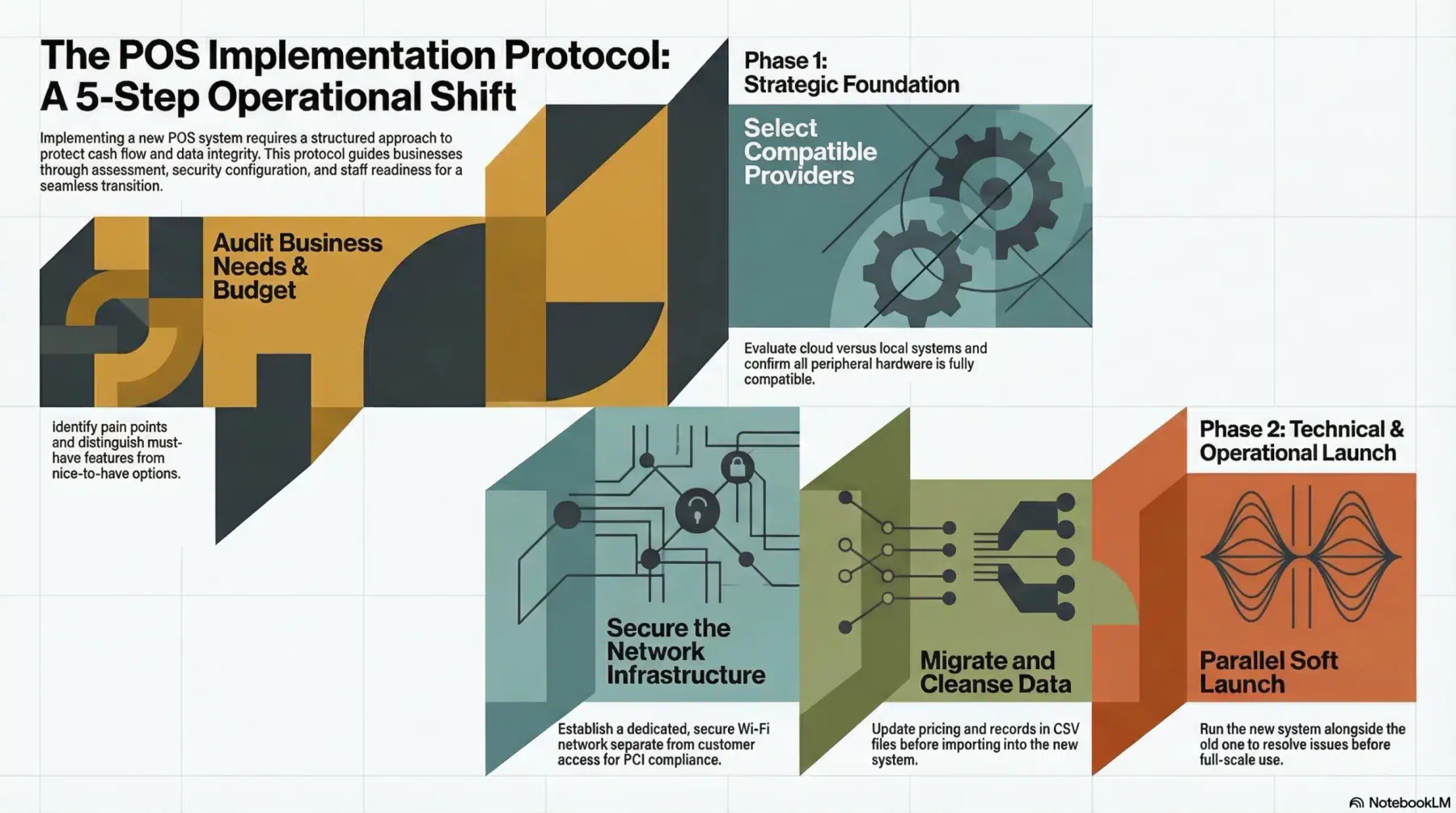
Installing a new POS machine is a significant operational shift. A structured approach reduces the risk of data loss, staff disruption, and cash flow interruption during the transition period.
Step 1: Assess Your Business Needs
Start with an audit of your current workflows. Identify the daily pain points your staff face. Do you need mobile terminals for tableside payments? Do you require integration with specialized scanners or weighing scales?
Separate your must-have features from your nice-to-haves. Set a realistic budget that accounts for upfront hardware costs, ongoing monthly software subscriptions, and per-transaction payment processing rates.
Step 2: Choose the Right Provider
Evaluate providers based on your requirements. Confirm that all peripheral hardware, such as printers, cash drawers, and customer-facing displays, is fully compatible with your chosen software before purchasing.
Step 3: Prepare Your Network and Security
A cloud-connected POS depends on a stable internet connection. Before installation, set up a dedicated, secure Wi-Fi network exclusively for your POS terminals and payment hardware.
This network should be completely separate from any customer-facing Wi-Fi to protect transaction data and support PCI DSS compliance.
Step 4: Migrate Data and Build Your Catalogue
Export your existing customer records, supplier lists, and inventory data into structured CSV files. Use this migration as an opportunity to clean your data. Remove discontinued products, update outdated pricing, and correct any errors before importing into the new system.
Once imported, configure your interface. Build color-coded menu categories for hospitality environments, or set up quick-access keys for high-volume retail items to reduce checkout time.
Step 5: Train Staff and Run a Soft Launch
Schedule training sessions outside of trading hours. Walk staff through all key processes: processing sales, applying discounts, splitting bills, voiding items, and completing end-of-day reconciliation.
Before going fully live, run the new POS in parallel with your old system for a few days. This creates a low-pressure environment to identify and resolve any issues before the system goes live on its own.
Common Pitfalls to Avoid When Upgrading Your POS System
Even well-planned POS upgrades can encounter avoidable problems. Knowing these pitfalls before they happen saves time, money, and a lot of avoidable stress.
- Ignoring Offline Mode
Internet outages can still occur even in well-connected areas. A cloud-based POS without a reliable offline mode can bring your business to a complete standstill during an outage. Look for a system that caches transactions locally and syncs them automatically once the connection is restored.
- Underestimating Total Costs
Hardware pricing is only part of the total investment. Factor in monthly software subscription tiers, premium integration fees, and per-transaction payment processing rates. Review the full terms before committing to understand your true monthly and annual expenditure.
- Skipping Integration Planning
A POS machine that cannot connect to your existing accounting software or e-commerce platform creates unnecessary manual data entry work. Before selecting a system, verify that it offers open APIs or built-in integrations with the tools your business already relies on.
- Overloading the Setup
Activating every available feature on day one can overwhelm staff and slow down the checkout process. Start with a streamlined, essential configuration. Introduce advanced features gradually as your team builds confidence with the core system.
Advanced POS Practices to Drive Business Growth
Once your POS is running smoothly, you can start using it to make better decisions, not just process sales.
Use Predictive Analytics
Go beyond reviewing daily sales totals. Advanced POS systems analyze historical data alongside seasonal trends and local events to forecast future demand. This supports smarter purchasing decisions, reduces overstock, and ensures product availability during peak periods.
Heat-mapping features identify which hours of the day generate the most revenue. Managers can use this data to roster staff more precisely, reducing labor costs without compromising service quality.
Connect Your Online and In-Store Channels
A well-integrated POS system syncs with your e-commerce platform in real time. When a product sells in-store, your online store updates instantly to reflect the correct stock level. This prevents overselling and supports services like click-and-collect and in-store returns of online purchases.
Unified inventory across physical and digital channels removes the need for manual reconciliation. Stock accuracy improves, and customers receive a consistent experience regardless of where they choose to shop.
Automate Loyalty and Marketing
Capturing customer details at checkout enables automated retention marketing. The system can trigger a discount offer for a customer who has not visited in 60 days, or send a personalized message on their birthday.
These actions run automatically in the background, improving retention without adding to staff workload.
Tiered loyalty programs built into the POS reward frequent shoppers with exclusive pricing or early access to new products. Customers who feel rewarded come back more often. That compounds over time in ways a one-off discount never does.
Centralize Operations With a Dedicated POS Module
Managing sales, inventory, customer data, and reporting from a single integrated platform removes the need to switch between disconnected tools. A dedicated POS software module keeps all business data consistent and accessible from one place.
This reduces the risk of discrepancies between departments and gives managers a clear, real-time view of business performance, always.
Conclusion
A POS machine is a central hub for managing inventory, understanding customer behavior, and making data-driven decisions that improve profitability. Businesses that treat their POS strategically gain a clear advantage over those that use it purely as a checkout tool.
Choosing and implementing the right system takes planning, but the long-term returns justify the effort. With the right hardware, software, and integrations in place, a POS machine becomes one of the most powerful operational tools available to any Australian business.
To learn further regarding POS machines, you can request a free consultation with us anytime. You should start today and develop a competitive advantage for your business as early as possible.
Frequently Asked Question
A POS machine, or Point of Sale machine, is a combination of hardware and software used to process customer payments, manage inventory, and record sales data at the point of purchase.
The three main types are traditional countertop POS systems, mobile tablet-based POS systems, and cloud-based POS systems. Each suits different business environments and transaction volumes.
A standard POS setup includes a terminal with a touchscreen display, a barcode scanner, a receipt printer, a cash drawer, and a customer-facing display. The exact combination varies depending on the industry and transaction volume.
A cloud-based POS stores all data on remote servers and updates automatically. An on-premise system stores data locally and requires manual maintenance. Cloud-based systems offer greater flexibility and real-time accessibility.
Costs vary depending on hardware, software subscription tier, and payment processing rates. Basic setups can start from a few hundred dollars, while full enterprise configurations can run into the thousands.
A basic implementation can take a few days. A full setup involving data migration, staff training, and integration with other business tools typically takes one to two weeks, depending on complexity.