





Malaysia’s manufacturing output rose 3.7% this January, but growth means nothing if your BOMs can’t keep up. As more orders come in and production lines get busier, even a small oversight in your bill of materials (BOM) can lead to costly delays or stock shortages.
That’s why more manufacturers are moving away from spreadsheets and manual methods. With a solution like HashMicro’s Manufacturing Software, you can automate your BOM process, ensure real-time updates, and minimize the risk of costly errors, all while scaling efficiently.
Your BOM is more than just a parts list. It’s the backbone of your production flow, guiding everything from procurement to assembly. A well-structured BOM ensures you always have the right components, at the right time, for every product run.
In this article, we’ll break down what a BOM is, why it’s vital to your manufacturing operations, and how automation can help you build smarter, faster, and with greater accuracy.
Key Takeaways
What is the Bill of Materials?A bill of materials (BOM) is a structured list of all the materials, subassemblies, components, and parts, along with their respective quantities, required to manufacture a product. It’s also referred to as a production recipe, assembly list, or component list. Beyond listing parts and quantities, a BOM typically includes specifications, quality standards, and an expected scrap rate for manufacturing cost estimation, supporting more accurate planning and cost control. This level of detail helps ensure that the final product meets desired performance and quality benchmarks. BOMs are widely used across industries such as manufacturing, construction, engineering, and even software development. No matter the sector, creating a BOM is often the first step in initiating a reliable and efficient production process. Benefits of Bill of MaterialsA bill of materials (BOM) helps improve production accuracy and keeps the manufacturing process running smoothly by serving as a clear, step-by-step guide. With a well-organized BOM, companies can:
By covering all these bases, the BOM helps teams run a more reliable, cost-efficient, and secure production process. Types of Bill of MaterialsThere are three main types of bill of materials:
Types of BOM DisplaysExplosion and implosion are two common ways to present the structure of a bill of materials (BOM):
Why Excel Isn’t Built for Bill of Materials ManagementUsing a spreadsheet might feel like the obvious way to manage your bill of materials (BOM). But once your product or operations grow, Excel starts showing its limits. Here’s why relying on it can slow you down:
So, what’s the bottom line? Spreadsheets weren’t designed for the complexity of modern manufacturing. With a dedicated BOM system, your team spends less time fixing errors and more time getting products out the door. Clearly, since Excel has its limits, you need to explore for a better option. A modern manufacturing software system is one of them, because it can simplify BOMs and so much more. Explore how it can work for your team; try the no-cost demo below. Structures of Bill of MaterialsA bill of materials (BOM) is usually arranged in a hierarchy, starting with the finished product at the top. It includes details like product codes, part descriptions, quantities, costs, and specifications. The two most common formats are single-level and multilevel BOMs. 1. Single-Level BOMThis is the simplest format, listing all assemblies or components needed to build a product, along with their required quantities. It’s easy to create and manage but lacks depth—it doesn’t show how components relate to subassemblies. So, if something breaks, it’s hard to trace the issue back to a specific part. 2. Multilevel BOMMore complex but far more detailed, a multilevel BOM maps out every component, subassembly, and their relationships. It provides a complete view of how a product is built—from top-level assemblies down to the smallest part—making it ideal for managing complex products and production workflows. How to Create a Bill of Materials
A bill of materials isn’t just a list. It’s a critical document that helps your team manage production, procurement, and costing with accuracy. Whether you’re producing in Penang, Johor, or Klang Valley, here’s how to create a BOM that works for your operations: 1. Part Name & Part NumberGive each material, ingredient, or component a clear and unique name. Assigning a part number (nombor komponen) or SKU makes tracking and reordering easier. You can use:
2. Part PhaseThis indicates where a part is in its lifecycle—design phase, released, or under revision. Tracking part status helps ensure that only approved components are used during production. 3. Levels & StructureBOMs are often multi-layered. Each level (tahap) shows where a component sits in the assembly structure. Clear levels help teams understand how everything fits together and support better planning. 4. Procurement TypeDefine how each item is sourced using standard codes:
5. Quantity & Units of MeasureList the quantity of each material needed and the unit of measurement (unit ukuran)—such as pieces, litres, meters, or kilograms. This avoids miscommunication between departments or with suppliers. 6. Product ColourIf your product comes in different colours, include this detail in the BOM. It prevents mistakes during assembly and ensures the right variant reaches your customer. 7. Description & NotesProvide a short, clear description for each item. You can also add notes for technical details, handling instructions, or anything the production team should be aware of. 8. Stock Cost (Kos Stok)Record the cost per unit based on the required quantity. This helps track material expenses in Ringgit (MYR) and gives your finance team accurate data for budgeting and pricing. Want to skip the manual work and reduce costly errors? A smart manufacturing system can automate BOM creation, manage multi-level assemblies, and keep all your data updated in real-time. How to Manage Bill of Materials More EfficientlyA bill of materials (BOM) isn’t a one-and-done document—it evolves as your product does. To keep it effective and relevant, here are some smart practices you can follow:
This is where using a requirements traceability matrix can add extra value. Mapping BOM components to project requirements improves visibility in sourcing, quality control, and compliance—crucial for full traceability in regulated industries. Speed Up Production with Automated BOM Tracking from HashMicro
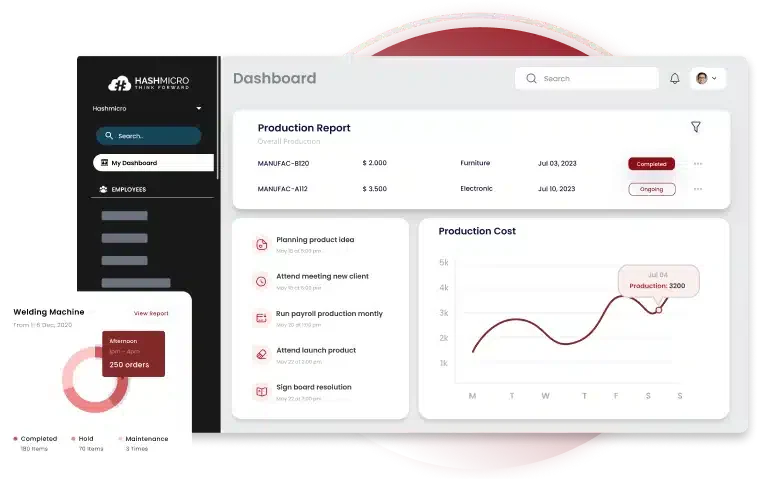
Managing a complex production process comes with its fair share of challenges, especially when you’re dealing with multi-level BOMs, fluctuating stock levels, and supplier coordination. Manual tracking just isn’t enough anymore. If you’re a manufacturer facing these issues, automating your BOM management can be a game-changer. That’s where HashMicro’s Manufacturing Software steps in. With full support for both single-level and multilevel BOMs, the system adapts to whatever you’re producing—whether it’s a simple product or one that involves several layers of assemblies and subcomponents. And because it connects directly with your inventory and accounting modules, you can generate accurate COGM reports without switching platforms. Here’s how HashMicro helps simplify your entire production flow:
In short, HashMicro turns BOM management from a manual burden into a fully integrated, effortless part of your workflow. ConclusionA bill of materials is a structured guide that lists everything needed to assemble a product efficiently. It helps manufacturers improve accuracy, control costs, and maintain a smooth, well-organized production process. If you’re tired of manual updates and spreadsheet errors, it’s time to switch to smarter BOM management. HashMicro’s Manufacturing Software handles everything from cost tracking to production planning: fast, accurate, and fully connected. With HashMicro, you get more than a tool. Instead, you get peace of mind in every production run. Book your free demo today and experience a simpler, smarter way to manage your manufacturing operations! FAQ on Bill of MaterialsWhat is the difference between a BOM and routing in manufacturing?A BOM specifies the materials and components required to produce a product, essentially detailing “what” is needed. In contrast, routing outlines the sequence of operations or steps involved in the manufacturing process, describing “how” the product is made. How does a BOM affect inventory management?An accurate BOM is crucial for effective inventory management as it helps in demand forecasting, procurement planning, and resource allocation. It ensures that the right components are available at the right time, minimizing excess inventory and reducing the risk of stockouts. How should BOM changes be handled during production?Managing BOM changes during production requires a structured approach, including a clear revision policy, version control, and communication with all stakeholders. Utilizing BOM management software can facilitate tracking changes, ensuring that updates are implemented smoothly without disrupting the production process. What is a phantom BOM?A phantom BOM represents a subassembly that is used in the manufacturing process but is not stocked as a separate item. It simplifies the production process by allowing the components of the phantom assembly to be picked and assembled as part of the parent item, without creating a separate production order for the subassembly. Ricky Halim is a technology and business development professional specializing in enterprise solution innovation. With extensive experience in product management and growth strategy, he plays a key role in positioning HashMicro as a leading ERP solution in Southeast Asia by aligning intelligent systems with the operational needs of modern businesses. HashMicro follows strict editorial standards and uses primary sources such as regulations, industry guidance, and trusted publications to keep content accurate and relevant.        Alia Alia Looking for a Free Demo?
Contact us via WhatsApp and let us know the software you are looking for. 15.21 |